Page 1 of 1

The installer

Posted: Thu Dec 20, 2018 3:50 pm
by GHD
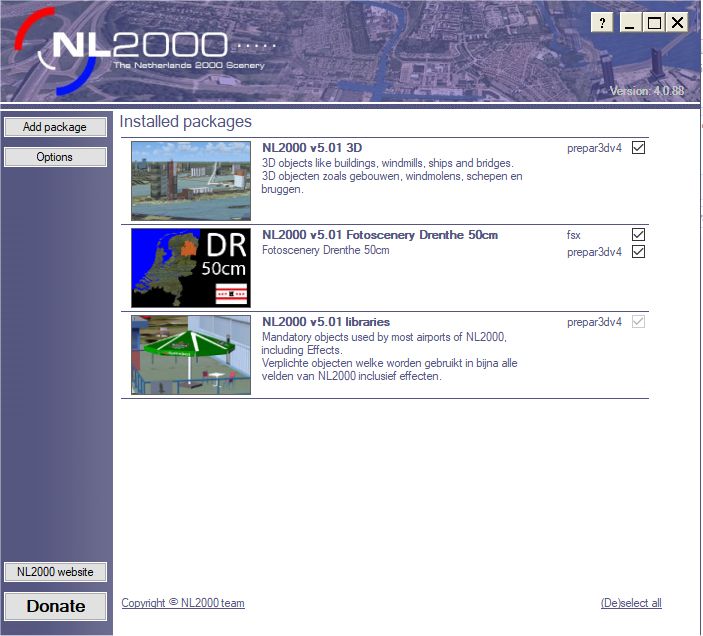
When I run the installer (V 4.0.88), I do not see what is in the manual.

I do not see the Copyright notice, all I see is a page with "Add Package":

Image

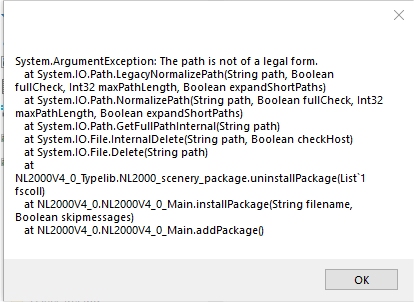
If I add a single file, it appears to work, but if I add multiple files, at the end of each, there is a system exception:

Image

What am I doing wrong?

George

Re: The installer

Posted: Thu Dec 20, 2018 4:00 pm
by GHD
Sorry, I should have said that I am using W10 and it is the same if I run the installer as Administrator.

Re: The installer

Posted: Thu Dec 20, 2018 11:45 pm
by phjoop
But did you installer the installer itself as administrator ( via the right mouseclick ) . After that you can install the packages as administrator , also via the right mouse click. See the Manuel version 5, you can download it in the download page too. Joop

Re: The installer

Posted: Fri Dec 21, 2018 12:03 am
by GHD
Thank you.

No, I didn't install the installer as Adminisrtatot.

I will uninstall and try again.

George

Re: The installer

Posted: Fri Dec 21, 2018 12:13 am
by GHD
Installing the installer as Adminitrator made no difference, I still don't see the copyright nor the facilty to install all packages.

Re: The installer

Posted: Fri Dec 21, 2018 12:20 am
by GHD
After adding the libraries, this was the end of my P3D scenery.cfg:

[Area.386]
Title=Frankfurt_Airport_2014
Local=G:\SCENERY\Germany_Addons_2014\Separate_German_Airfields\Frankfurt_Airport_2014
Layer=386
Active=TRUE
Required=FALSE

[Area.402]
Title=NL2000 v5.0 libraries
Local=E:\NL2K-Scenery\NL2000\nl2k_v5_libraries
Layer=402
Active=True
Required=FALSE

As you can see, the Area number is incorect,

I HATE INSTALLERS :evil:

Re: The installer

Posted: Fri Dec 21, 2018 10:47 am
by phjoop
Hi George , From here I cannot look inside your system. But try this :
Go to E:\NL2K-Scenery\NL2000\nl2k_v4_InstallerData and delete nl2k_v5.01_libraries.nl2 that's in there .
Delete in de P3D library the library item too. And let P3D work the database.
If you have installed the installer as administrator ( via the right mouseclick ) , you start up the installer and again as administrator ( via the right mouseclick ). Then you choose the library package to add and you can tell the installer where you want to install it. Then the installer will place the library item in your system and in the P3D library ( scenery.cfg) .
I hope this works for you . Joop

Re: The installer

Posted: Fri Dec 21, 2018 11:53 am
by GHD
It seems to be ok now. I started from scratch and all areas are in sequence.

However, even after installling the installer an running it as Administrator, I still have not yet seen the copyright notice.

[Area.386]
Title=Frankfurt_Airport_2014
Local=G:\SCENERY\Germany_Addons_2014\Separate_German_Airfields\Frankfurt_Airport_2014
Layer=386
Active=TRUE
Required=FALSE

[Area.387]
Title=NL2000 v5.0 libraries
Local=E:\NL2K-Scenery\NL2000\nl2k_v5_libraries
Layer=387
Active=True
Required=FALSE

[Area.388]
Title=NL2000 v4.0 Fotoscenery Zuid-Holland
Local=E:\NL2K-Scenery\NL2000\nl2k_v5_resample_ZH
Layer=388
Active=True
Required=FALSE

[Area.389]
Title=NL2000 v4.0 Fotoscenery Zeeland
Local=E:\NL2K-Scenery\NL2000\nl2k_v5_resample_ZE
Layer=389
Active=True
Required=FALSE

[Area.390]
Title=NL2000 v4.0 Fotoscenery Utrecht
Local=E:\NL2K-Scenery\NL2000\nl2k_v5_resample_UT
Layer=390
Active=True
Required=FALSE

[Area.391]
Title=NL2000 v4.0 Fotoscenery Overijssel
Local=E:\NL2K-Scenery\NL2000\nl2k_v5_resample_OV
Layer=391
Active=True
Required=FALSE

[Area.392]
Title=NL2000 v4.0 Fotoscenery Noord-Holland
Local=E:\NL2K-Scenery\NL2000\nl2k_v5_resample_NH
Layer=392
Active=True
Required=FALSE

[Area.393]
Title=NL2000 v4.0 Fotoscenery Noord-Brabant
Local=E:\NL2K-Scenery\NL2000\nl2k_v5_resample_NB
Layer=393
Active=True
Required=FALSE

[Area.394]
Title=NL2000 v4.0 Fotoscenery Limburg
Local=E:\NL2K-Scenery\NL2000\nl2k_v5_resample_LI
Layer=394
Active=True
Required=FALSE

[Area.395]
Title=NL2000 v4.0 Fotoscenery Groningen
Local=E:\NL2K-Scenery\NL2000\nl2k_v5_resample_GR
Layer=395
Active=True
Required=FALSE

[Area.396]
Title=NL2000 v4.0 Fotoscenery Gelderland
Local=E:\NL2K-Scenery\NL2000\nl2k_v5_resample_GE
Layer=396
Active=True
Required=FALSE

[Area.397]
Title=NL2000 v4.0 Fotoscenery Friesland
Local=E:\NL2K-Scenery\NL2000\nl2k_v5_resample_FR
Layer=397
Active=True
Required=FALSE

[Area.398]
Title=NL2000 v4.0 Fotoscenery Flevoland
Local=E:\NL2K-Scenery\NL2000\nl2k_v5_resample_FL
Layer=398
Active=True
Required=FALSE

[Area.399]
Title=NL2000 v4.0 Fotoscenery Drenthe
Local=E:\NL2K-Scenery\NL2000\nl2k_v5_resample_DR
Layer=399
Active=True
Required=FALSE

[Area.400]
Title=NL2000 v5.0 Traffic Prepar3D
Local=E:\NL2K-Scenery\NL2000\nl2k_v5_traffic_Prepar3D
Layer=400
Active=True
Required=FALSE

[Area.401]
Title=NL2000 v5.0 3D
Local=E:\NL2K-Scenery\NL2000\nl2k_v5_3D
Layer=401
Active=True
Required=FALSE

Imagefallout mariposa military base

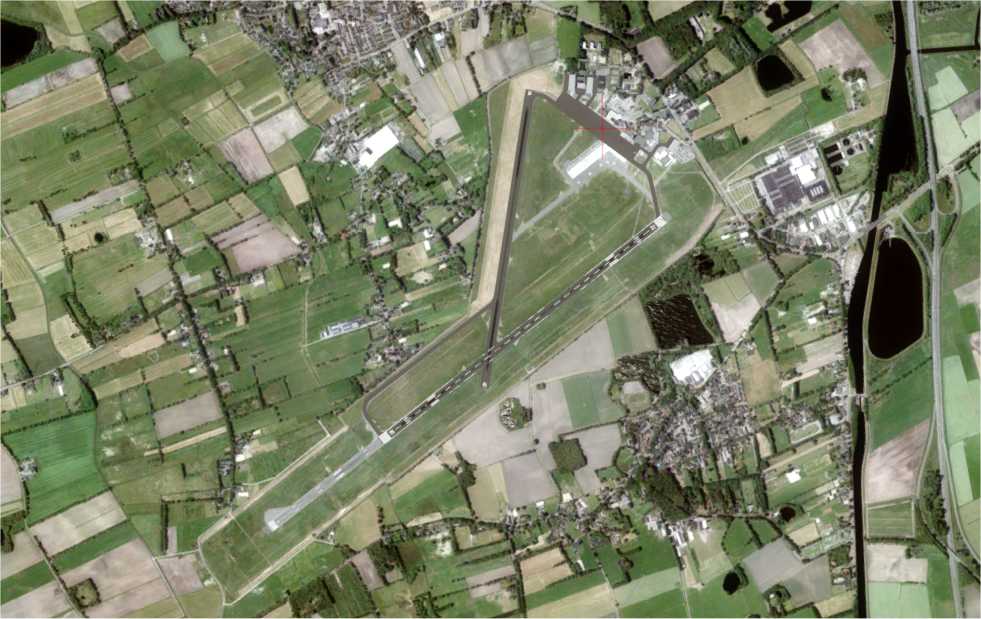
And top-down views at Gronigen:
Image

Image

George

Re: The installer

Posted: Fri Dec 21, 2018 3:10 pm
by phjoop
OK George, Happy flying
Joop

Re: The installer

Posted: Fri Dec 21, 2018 4:14 pm
by NicoO
George,
For your information, the manual is just a separate pdf file which has nothing to do with the installer.
Regards Nico

Re: The installer

Posted: Fri Dec 21, 2018 4:43 pm
by GHD
NicoO wrote: ↑Fri Dec 21, 2018 4:14 pm George,
For your information, the manual is just a separate pdf file which has nothing to do with the installer.
Regards Nico
Yes, but it does describe the installer and I don't see what it says I should.

George